- Home
- All templates
- Photo dump templates
- From my SD card
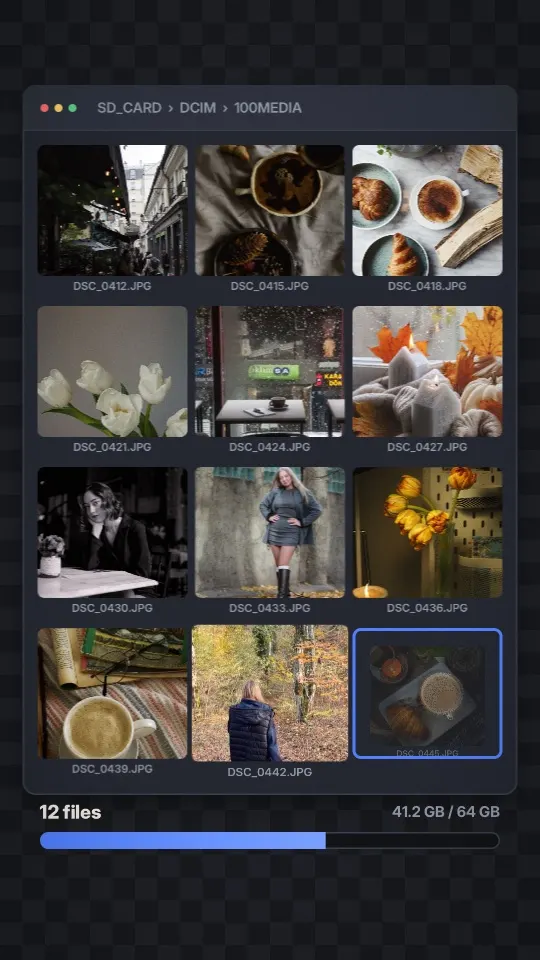
Photo dump · Reel
From My SD Card Reel Template
A Photo dump Reel that looks like you plugged a camera card into a laptop. A dark file-explorer window shows the path "SD_CARD › DCIM › 100MEDIA," a grid of thumbnails named DSC_0412.JPG and so on, and a storage bar at the bottom reading 12 files. Thirteen photos or videos, three of them short clips, play across about fifteen seconds to the beat, and your favorite photo stays last. The folder labels and "nov '26" style text can be edited.
Included with ReelClub Pro: $4.99/week or $29.99/year, 3-day free trial.
Perfect for
- Camera roll dump from a month
- Digital camera and files aesthetic
- Year-end SD card recap
What you’ll need
- moment 1
- short video / moment 2
- moment 3
- moment 4
- moment 5
- short video / moment 6
- moment 7
- moment 8
- moment 9
- short video / moment 10
- moment 11
- moment 12
- favorite photo (stays last)
Tip: Use short clips for slots two, six and ten so the grid stays alive, and keep your favorite photo for the very last frame.
Text you can change
- “from my SD card lately”
- “that’s all.”
- “nov ’26”
Every line, font and style can be changed in the editor.
Caption ideas
- from my sd card lately
- files: 12, memories: more
- that's all.
How do you use this template?
- Download ReelClub from the App Store and open this template.
- Tap “Use template” and pick photos and videos from your library. The app shows what each slot is for.
- Change the text, music or framing if you like, then export. It saves to Photos, ready for Instagram or TikTok.
You might also like

Your photos, edited.
Download ReelClub on iPhone. Browse every template for free, use 10 of them without paying, and try Pro free for 3 days.




