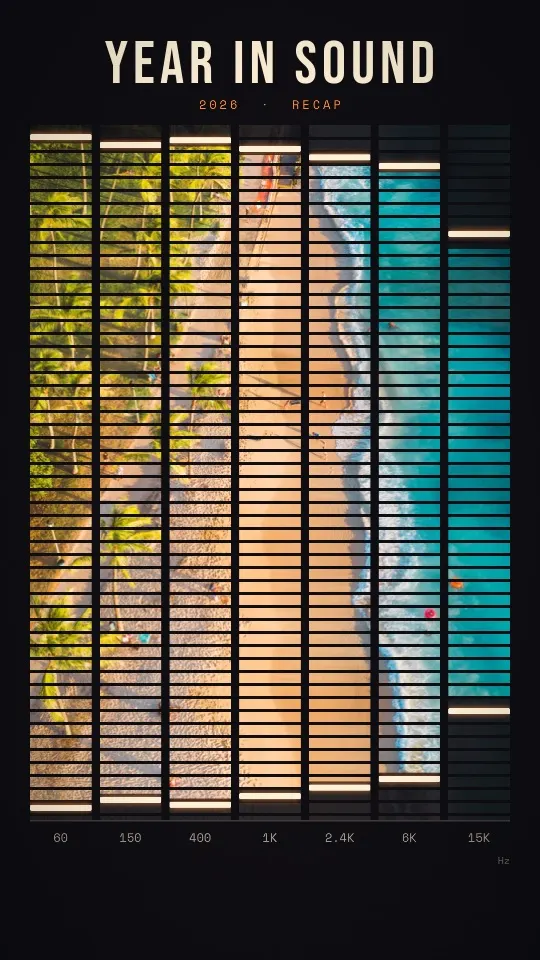
Photo dump · Reel
Equalizer Reel Template
A year recap built like an audio equalizer. Six tall vertical bars, each made of horizontal slices, show your photos as if levels were rising on a stereo, with a big "year in sound" headline over them. The look is dark, gold and neon, and it fits music-heavy memories.
The template has 10 slots, 2 of them video-only. Bars 1 to 4 each take a photo that gets split into bands, with quick shots after. It runs about 15 seconds, with every cut on the beat. The headline and small texts such as "turn it up" can be edited for a concert, a party season or your own year.
Included with ReelClub Pro: $4.99/week or $29.99/year, 3-day free trial.
Perfect for
- Year-in-sound recaps
- Concert and festival highlights
- Party-season photo dumps with a beat
What you’ll need
- bar 1 (split into bars)
- bar 2 (split into bars)
- bar 3 (split into bars)
- bar 4 (split into bars)
- quick shot 1
- quick shot 2
- quick shot 3
- quick shot 4
- video: the drop (concert, dancing)
- video: closing
Tip: Use tall, vertical photos for the four bar slots, since each one is sliced into bands, and keep bold, colorful shots for the fast frames afterward.
Text you can change
- “2026 · RECAP”
- “turn it up”
- “year in sound”
- “play again”
Every line, font and style can be changed in the editor.
Caption ideas
- turn it up, this is my year
- play again
- year in sound
How do you use this template?
- Download ReelClub from the App Store and open this template.
- Tap “Use template” and pick photos and videos from your library. The app shows what each slot is for.
- Change the text, music or framing if you like, then export. It saves to Photos, ready for Instagram or TikTok.
You might also like
Your photos, edited.
Download ReelClub on iPhone. Browse every template for free, use 10 of them without paying, and try Pro free for 3 days.




