- Home
- All templates
- Story templates
- Weekly journal
Everyday · Story
Weekly Journal Story Template
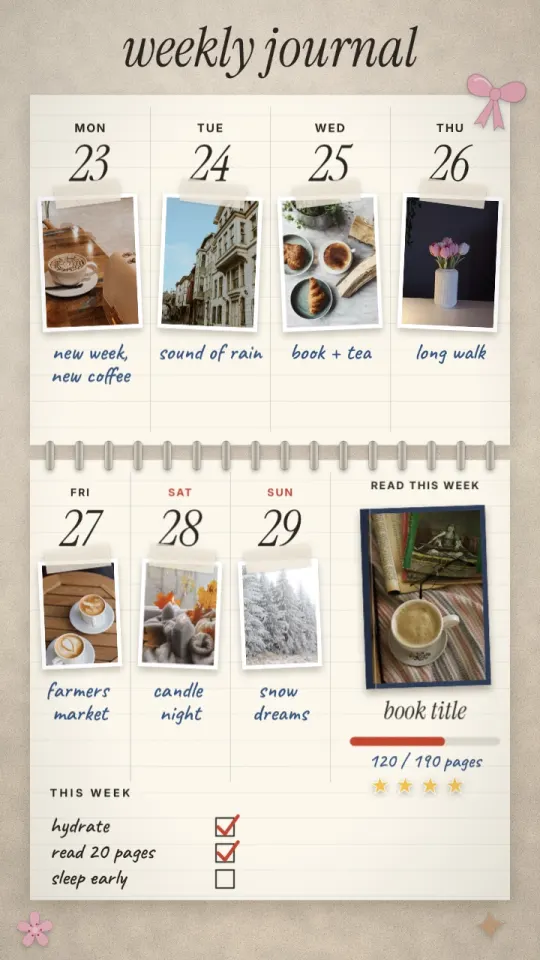
A planner-page story that lays your whole week out day by day. The sheet carries a cursive title ("weekly journal"), a spiral binding in the middle, seven dated day tiles from Monday 23 to Sunday 29 with a handwritten note under each, and a "read this week" card with a book cover, a progress bar and a star rating.
Eight photos in total: seven for the days and one for the book. A small goal checklist (hydrate, read 20 pages, sleep early) sits at the bottom. Day notes, goals, book title and page count are editable, and so are fonts and styles.
Included with ReelClub Pro: $4.99/week or $29.99/year, 3-day free trial.
Perfect for
- Week-in-review planner story
- Reading and habit tracking
- Sunday reset with photos of every day
What you’ll need
- read this week: book cover
- monday: coffee / morning
- tuesday: street / road
- wednesday: table / food
- thursday: flowers / home
- friday: a moment outside
- saturday: evening / candle
- sunday: landscape
Tip: Snap one quick photo a day and fill the slots in weekday order, with the book cover in the first slot. Then rewrite each day note and the page count.
Text you can change
- “weekly journal”
- “new week, new coffee”
- “sound of rain”
- “book + tea”
- “long walk”
- “farmers market”
- “candle night”
- “snow dreams”
- “hydrate”
- “read 20 pages”
Every line, font and style can be changed in the editor.
Caption ideas
- my week, one tile at a time
- new week, new coffee
- 120 pages in, 3 habits kept
How do you use this template?
- Download ReelClub from the App Store and open this template.
- Tap “Use template” and pick photos and videos from your library. The app shows what each slot is for.
- Change the text, music or framing if you like, then export. It saves to Photos, ready for Instagram or TikTok.
You might also like
Your photos, edited.
Download ReelClub on iPhone. Browse every template for free, use 10 of them without paying, and try Pro free for 3 days.




