Everyday · Story
My Day Story Template
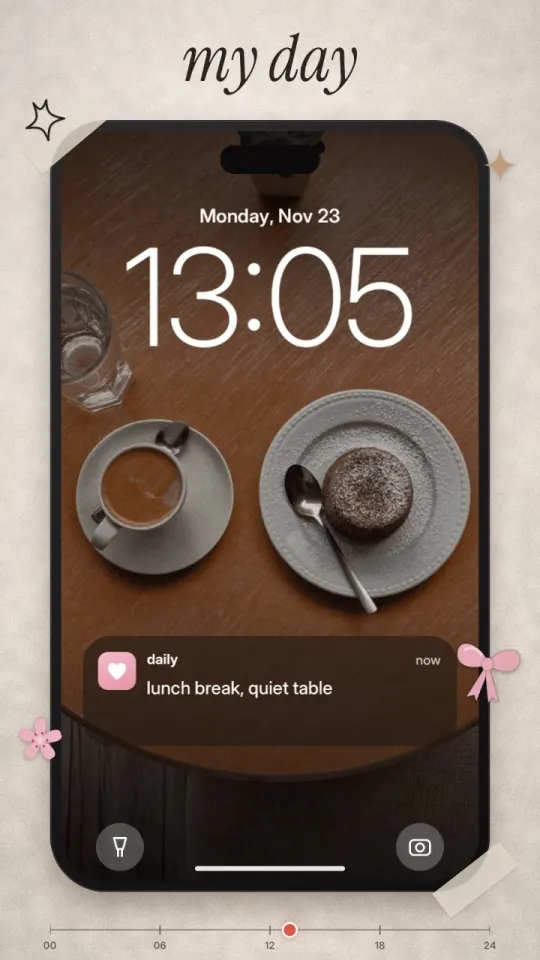
A lock-screen story that dates one moment of your day. A big phone with a notch and a camera shortcut shows "Monday, Nov 23" and a huge "13:05" clock over your photo, with a small notification at the bottom ("lunch break, quiet table"), pink bow and heart stickers and a day timeline running along the bottom edge.
It takes one photo, such as lunch, and the day, time and notification text are editable, along with fonts and styles. Rather than an entire day in a grid, it freezes one specific minute, which suits vlog-style captions and midday check-ins.
Included with ReelClub Pro: $4.99/week or $29.99/year, 3-day free trial.
Perfect for
- Midday check-in with a time stamp
- Vlog-style single moment
- Lunch break or cafe post
What you’ll need
- lunch
Tip: Choose a photo whose subject sits in the lower half, such as a table, since the clock and date cover the top. Set the true time.
Text you can change
- “my day”
- “lunch break, quiet table”
- “13:05”
- “Monday, Nov 23”
Every line, font and style can be changed in the editor.
Caption ideas
- 13:05, lunch break, quiet table
- my day, one minute of it
- monday, a small notification from myself
How do you use this template?
- Download ReelClub from the App Store and open this template.
- Tap “Use template” and pick photos and videos from your library. The app shows what each slot is for.
- Change the text, music or framing if you like, then export. It saves to Photos, ready for Instagram or TikTok.
You might also like
Your photos, edited.
Download ReelClub on iPhone. Browse every template for free, use 10 of them without paying, and try Pro free for 3 days.




