- Home
- All templates
- Christmas & winter
- Channel surfing
Everyday · Reel
Channel Surfing Reel Template
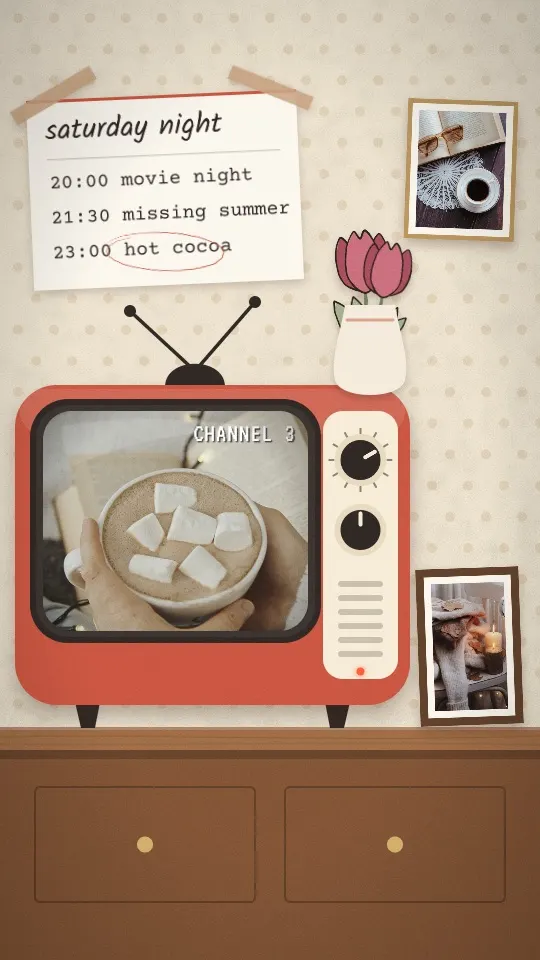
A Saturday night at home, programmed like a retro TV schedule. The Reel opens with your sofa, a cozy corner and a blanket, then a book or coffee, and plays three short clips as if you were switching channels: movie night, another channel and a warm moment. Two slots take photos and three take video. About 16 seconds, music cut to the beat. Edit the program times and titles, such as "20:00 movie night" or "23:00 hot cocoa", and the closing "enjoy the show". It needs ReelClub Pro.
Included with ReelClub Pro: $4.99/week or $29.99/year, 3-day free trial.
Perfect for
- Movie night at home
- Cozy weekend evening recaps
- Retro TV style Reels
What you’ll need
- home, a cozy corner, blanket
- book / coffee
- video: movie night
- video: another channel
- video: a warm moment
Tip: Film the three clips of the evening itself: the screen, a snack, hot chocolate. Photograph the couch and a book or coffee for the first two.
Text you can change
- “enjoy the show”
- “saturday night”
- “20:00 movie night”
- “21:30 missing summer”
- “23:00 hot cocoa”
Every line, font and style can be changed in the editor.
Caption ideas
- enjoy the show
- 20:00 movie night, 23:00 hot cocoa
- saturday night, nowhere to be
How do you use this template?
- Download ReelClub from the App Store and open this template.
- Tap “Use template” and pick photos and videos from your library. The app shows what each slot is for.
- Change the text, music or framing if you like, then export. It saves to Photos, ready for Instagram or TikTok.
You might also like
Your photos, edited.
Download ReelClub on iPhone. Browse every template for free, use 10 of them without paying, and try Pro free for 3 days.




