- Home
- All templates
- Christmas & winter
- Darkroom polaroids
Everyday · Reel
Darkroom Polaroids Reel Template
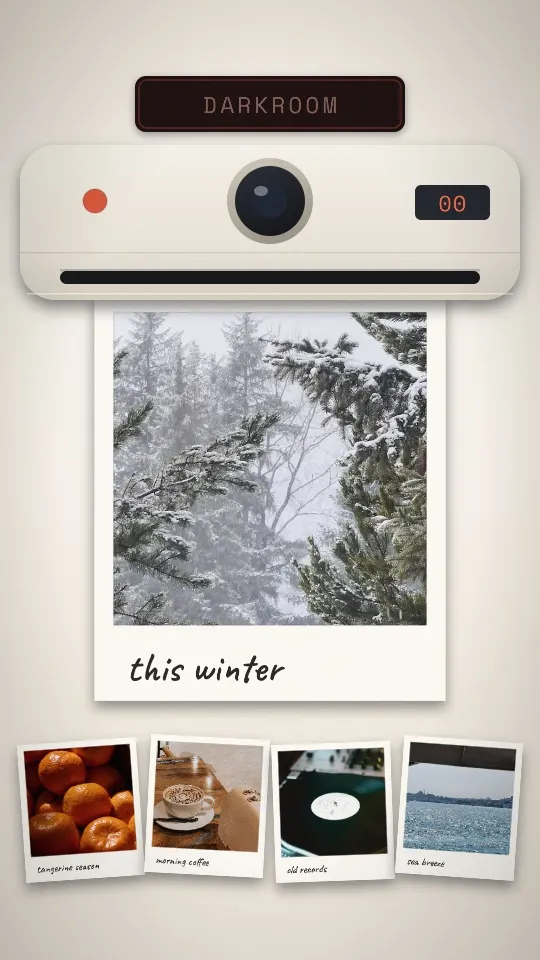
A retro camera sits at the top of the screen with a "darkroom" display, and photos come out of its slot as polaroids with handwritten captions, "this winter" on the first one. Smaller prints line up underneath, tinted warm, and the last slot is a video.
It has 5 slots in total, 4 photos plus 1 video, and runs around 16 seconds with every cut on the beat. Edit every caption, such as "tangerine season" or "old records," and change the font and style. It suits a season recap more than a whole year.
Included with ReelClub Pro: $4.99/week or $29.99/year, 3-day free trial.
Perfect for
- Winter or autumn memory recaps
- A week's best frames, polaroid-style
- Retro-camera aesthetic photo dumps
What you’ll need
- a colorful detail (square)
- morning, light, shadow
- a corner at home
- a view outside
- video: closing moment (snow, road, sea)
Tip: Start with a colorful detail in a square-friendly crop, then keep the video for a closing moment like snow, a road or the sea so the reel ends with movement.
Text you can change
- “this winter”
- “tangerine season”
- “morning coffee”
- “old records”
- “sea breeze”
- “darkroom”
Every line, font and style can be changed in the editor.
Caption ideas
- developed this winter
- tangerine season, old records, morning coffee
- the darkroom of my camera roll
How do you use this template?
- Download ReelClub from the App Store and open this template.
- Tap “Use template” and pick photos and videos from your library. The app shows what each slot is for.
- Change the text, music or framing if you like, then export. It saves to Photos, ready for Instagram or TikTok.
You might also like

Your photos, edited.
Download ReelClub on iPhone. Browse every template for free, use 10 of them without paying, and try Pro free for 3 days.




