- Home
- All templates
- Photo dump templates
- Nine squares
Collage · Reel
Nine Squares Reel Template
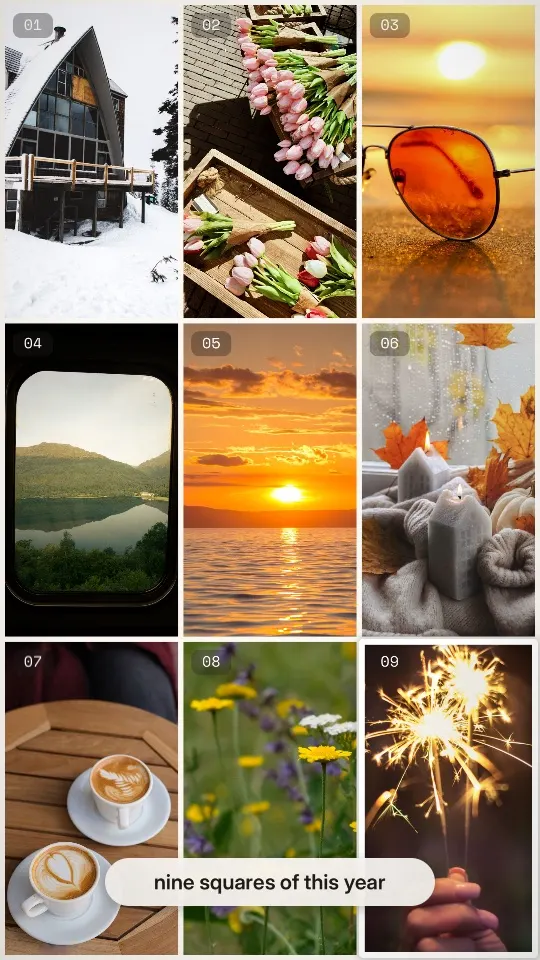
A Reel that puts a 3x3 grid on screen. The look is a dark phone-gallery layout with small index numbers, 01 to 09, in each cell, and a caption bar at the bottom: "nine squares of this year." The grid ends up looking like your own camera roll, just edited.
It has 9 slots, with 2 that can be video, and runs about 14 seconds, to a beat-synced soundtrack. Edit the caption, whether it is "this was the best" or "all nine were lovely." Choose the nine that tell the year, and mix colors and subjects so the grid reads well from a distance.
Included with ReelClub Pro: $4.99/week or $29.99/year, 3-day free trial.
Perfect for
- A best-nine-of-the-year recap
- A monthly highlights grid
- Photo dumps in a tidy format
What you’ll need
- 01
- 02
- 03
- 04
- 06
- 07
- 09
- video: 05, the middle one (best moment)
- video: 08
Tip: Alternate light and dark pictures, warm and cool tones, across the grid, because neighbors in a 3x3 look best when they contrast.
Text you can change
- “this was the best”
- “nine squares of this year”
- “all nine were lovely”
Every line, font and style can be changed in the editor.
Caption ideas
- nine squares of this year
- this was the best
- all nine were lovely
How do you use this template?
- Download ReelClub from the App Store and open this template.
- Tap “Use template” and pick photos and videos from your library. The app shows what each slot is for.
- Change the text, music or framing if you like, then export. It saves to Photos, ready for Instagram or TikTok.
You might also like
Your photos, edited.
Download ReelClub on iPhone. Browse every template for free, use 10 of them without paying, and try Pro free for 3 days.




