- Home
- All templates
- Photo dump templates
- Month calendar
Story · Story
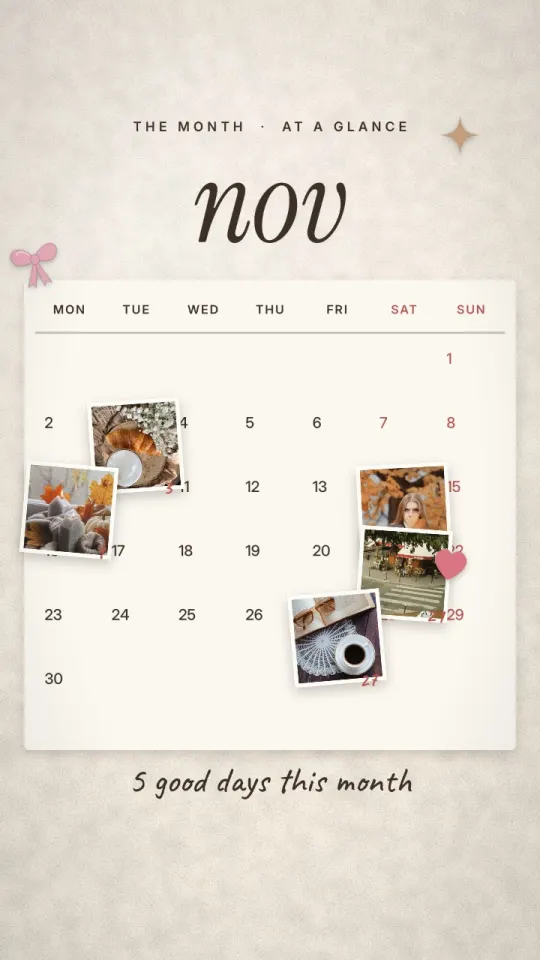
Month Calendar Story Template
A single 9:16 story that turns the month's calendar page into a recap. A cream paper background holds a serif month name ("nov") with a small bow, "the month at a glance" above it, and a full Monday-to-Sunday date grid with weekends in red.
Five photos are stuck onto the days that mattered, each tilted like a printed snapshot with a bit of tape, while a handwritten line below counts "5 good days this month". Edit the month name, the top line and the bottom note, and change fonts and styles. The first slot should be the month's first good day.
Included with ReelClub Pro: $4.99/week or $29.99/year, 3-day free trial.
Perfect for
- Month-end recap on a calendar
- Highlighting five memorable days
- Planner-style story for a new month
What you’ll need
- the month's first good day
- frame 2
- frame 3
- frame 4
- frame 5
Tip: Pick five different days and keep the photos in date order. The first slot is the month's first good day, so open with your strongest morning or brightest moment.
Text you can change
- “5 good days this month”
- “nov”
- “THE MONTH · AT A GLANCE”
Every line, font and style can be changed in the editor.
Caption ideas
- five good days in november
- the month, at a glance
- circled in red, remembered in photos
How do you use this template?
- Download ReelClub from the App Store and open this template.
- Tap “Use template” and pick photos and videos from your library. The app shows what each slot is for.
- Change the text, music or framing if you like, then export. It saves to Photos, ready for Instagram or TikTok.
You might also like





Your photos, edited.
Download ReelClub on iPhone. Browse every template for free, use 10 of them without paying, and try Pro free for 3 days.




