- Home
- All templates
- Collage
- Outfit notes
Collage · Reel
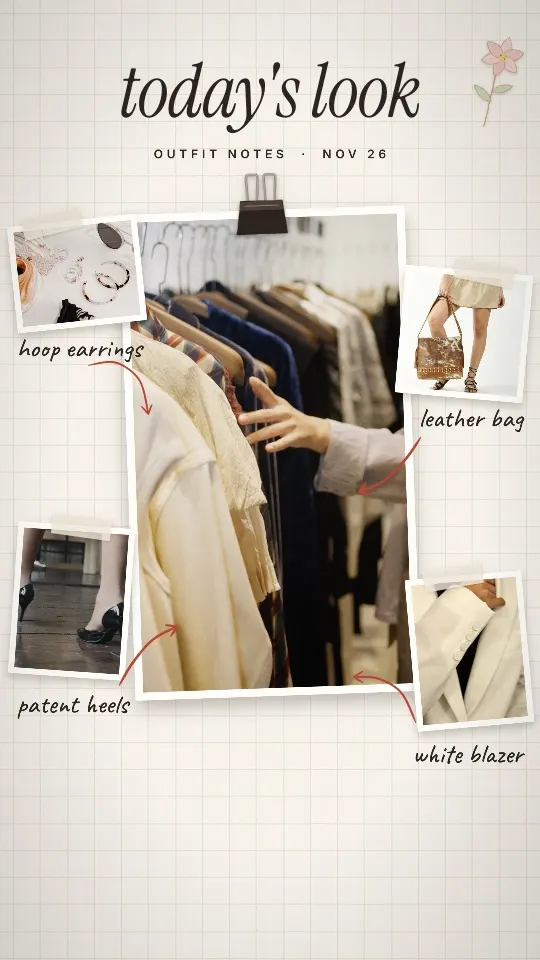
Outfit Notes Reel Template
Today's outfit, piece by piece. The Reel zooms into details, like jewelry, a bag, shoes and a jacket or fabric, then shows the full look as a vertical clip, at the mirror or on a rack, and a final detail while getting ready. Four slots take photos and two take video. About 12 seconds, music cut to the beat. The labels read like notes, with "outfit notes" and a date, plus lines such as "hoop earrings" and "leather bag" that you can change. It needs ReelClub Pro.
Included with ReelClub Pro: $4.99/week or $29.99/year, 3-day free trial.
Perfect for
- Get ready with me posts
- Daily outfit and style notes
- Thrift or wardrobe pieces showcase
What you’ll need
- detail: jewelry
- detail: bag
- detail: shoes
- detail: jacket / fabric
- video: your outfit (vertical, mirror or rack)
- video: a detail while getting ready
Tip: Photograph each accessory flat on a plain surface, and film the full outfit vertically, in a mirror or on a rack.
Text you can change
- “OUTFIT NOTES · NOV 26”
- “today's look”
- “easy but thoughtful”
- “hoop earrings”
- “leather bag”
- “patent heels”
- “white blazer”
Every line, font and style can be changed in the editor.
Caption ideas
- today's look
- easy but thoughtful
- hoop earrings, leather bag
How do you use this template?
- Download ReelClub from the App Store and open this template.
- Tap “Use template” and pick photos and videos from your library. The app shows what each slot is for.
- Change the text, music or framing if you like, then export. It saves to Photos, ready for Instagram or TikTok.
You might also like
Your photos, edited.
Download ReelClub on iPhone. Browse every template for free, use 10 of them without paying, and try Pro free for 3 days.




